TL;DR: On October 8, 2026, Shopify announced two new connectors: one for Grok, the chat app, and one for Grok Bot, the always-on agent product. Grok is pitched for questions about your store. Grok Bot runs named agents that check orders, track inventory, and keep product listings up to date, and it can rerun a saved job on a schedule while your laptop is closed. Both connect through a server Shopify hosts, with a Shopify sign-in and a Shopify consent screen. There is no standalone Grok Bot price: it comes with most paid Cursor and SuperGrok plans. Start read-only, and start with inventory.
Shopify's post on X was three lines long:
"New connectors just dropped:
Connect to @grok to ask questions about your business
Or connect to @bot to build a team of agents that help you run it"
The Grok Bot account followed with its own: "Grok Bot can now help run your Shopify store. Connect Shopify, then ask it to check orders, track inventory, and keep product listings up to date."
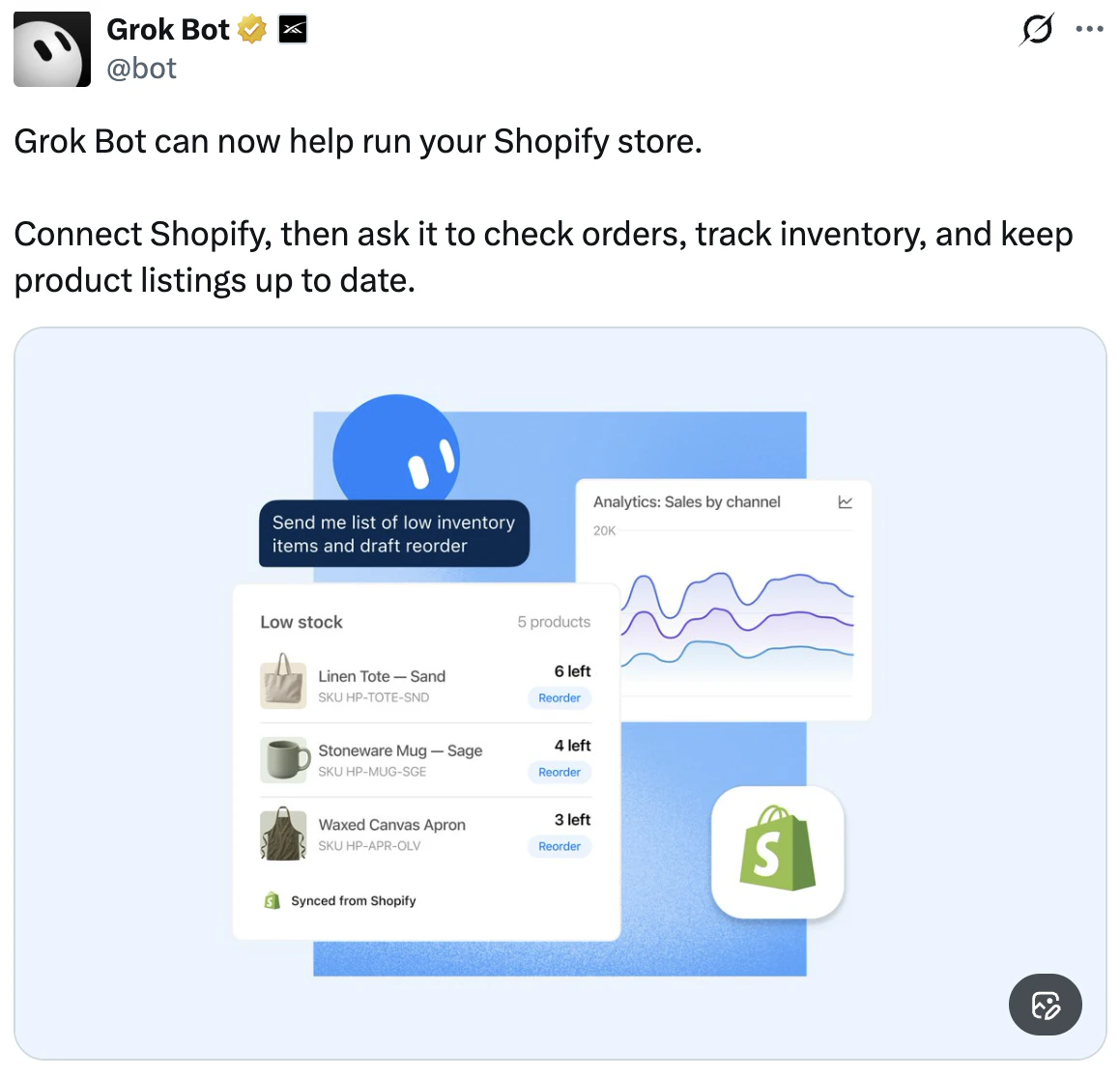
Source: Grok Bot on X, October 8, 2026.
Elon Musk added, as reported by Newsquawk, that anyone with a Grok Bot account can add the Shopify connector just by asking their Bot.
That is the entire announcement, as far as I could find. No Shopify help article, no feature list, no pricing page.
So on launch day the search results contradicted each other. One write-up says there is no official Grok integration for Shopify. Another says the official connector is still in development. A third walks you through a third-party middleman.
I went to the primary sources instead. Every claim below about the connectors and about Grok Bot comes from those posts, Cursor's public plugin repository, its Grok Bot docs and forum, the public sign-in metadata on Shopify's connector server, and the connector list in Shopify's help center, all as they stood on October 8, 2026. Where I am giving an opinion, I say so.
One note on scope. This post covers what the two tools are, how the connection works, how to set it up, and what to check before you approve access. It is not a performance review. The connectors are too new for that.
What Shopify and Grok shipped
Two connectors, one for each Grok product.
| Grok | Grok Bot | |
|---|---|---|
| What it is | The chat app at grok.com | Named agents ("Bots") that work on a persistent cloud computer |
| Shopify's pitch | "ask questions about your business" | "build a team of agents that help you run it" |
| Built for | A question, answered in the conversation | Multi-step and recurring jobs |
| What it reaches | Products, prices, orders, customers, inventory, sales | The same store connection, used by agents for longer jobs |
| Where you connect | Connectors on grok.com | In the Grok Bot app. Needs version 0.49 or newer |
The Grok Bot side is a thin layer on top of the Grok side. The plugin's README describes it as a plugin "that connects agents to the Grok Shopify connector." One connection to your store, two ways to use it.
One thing the sources do not settle: whether the chat app can also change things in your store, or only answer questions. Both products talk to the same Shopify server. Do not assume the chat side is read-only.
A note on timing. The plugin that puts the connector inside Grok Bot was opened and merged on September 24, and its notes describe the Grok connector as "launching on grok.com for 9/30." The public posts came on October 8. I cannot tell you which day it went live for your account. I can tell you the plugin was merged two weeks before the launch posts.
Is this an official Shopify integration?
Yes. This is the question the search results get wrong, so here is the evidence.
The connector's configuration is one line. It points at an MCP server (MCP is the Model Context Protocol, the standard that lets an AI app talk to another system) at this address:
https://setup.shopify.com/mcp
That is Shopify's domain. The plugin's README calls it "Shopify's hosted MCP for a connected store." You sign in on Shopify, you approve access on Shopify's consent screen, and Grok holds the authorization that comes back.
What that means in practice:
- No API keys. You do not create a custom app or paste an Admin API token anywhere.
- No middleman required. The third-party guides that appeared the same day put another company between the agent and your store. Those routes existed before the connector did. For the basics, you no longer need one.
- Shopify runs the server, not xAI. The same README carries a caution to take at face value: "Third-party connectors are not built or maintained by xAI. Use caution when granting access to external services. Review the permissions before connecting."
Cursor's forum shows the problem that came before it. On August 23, a user reported that Grok Bot's browser could not log in to Shopify at all: "it's completely blocked." Staff replied the next day that "Shopify's bot protection is blocking sign-in from the agent computer's browser." On September 4, a merchant posted that Grok Bot was managing his store one day and stopped the next, because of a Shopify human-verification check. A staff member confirmed the cause the same day - "the agent computer's browser is getting flagged by Shopify's anti-bot check" - and said the team was looking at a connector. The plugin merged on September 24.
The plugin's notes do not say the connector was built because of this. My read is that it was, and that the lesson holds either way: an agent that clicks around your admin in a browser will keep getting stopped by a platform that defends against bots. The path that lasts is the one the platform hosts. It is the same pattern as Shopify's connectors for ChatGPT and Claude.
One thing not to confuse it with. The marketplace already had a "Shopify" plugin, the Shopify AI Toolkit. Per the plugin notes, that one is 21 developer skills with no store access. It helps you build on Shopify. It does not read your orders. The README says the two "are meant to converge into a single 'Shopify' plugin" later. If you want the marketer's view of the Toolkit, I wrote a separate playbook.
What is Grok Bot?
Grok Bot is the agent product that sits alongside the Grok chat app: named AI teammates, called Bots, that work on a persistent cloud computer with a browser, a filesystem, and a terminal, and keep working after you close your laptop. Its docs put it this way: "Grok Bot gives you Bots you can keep around: AI teammates with names, jobs, and context that compounds over time."
(A note on the links: Grok Bot is announced on x.ai, and its documentation and plan pages live on cursor.com.)
The parts that matter if you run a store:
- Bots remember. The docs answer "What does a Bot remember?" with: "Stable preferences, role context, and summaries of prior work."
- Bots repeat. Walk one through a job once and it can "save the path as a skill and rerun it on a schedule."
- Bots run side by side. They "can run in parallel, message each other, share context in group chats, and pass ownership of a task." That is the "team of agents" in Shopify's post.
- Bots use plugins first. The docs say they use "plugins where available and computer use for everything else." The Shopify connector moves your store out of the second group and into the first.
- Your Bots share one computer. All of them use the same cloud computer, "sharing its files, browser sessions, and app logins." The docs spell out the consequence: "treat anything placed on it as available to every Bot you run." The team docs say the same about connectors: "Any permitted connector is available to every Bot a member runs."
That last one matters for anyone picturing a tidy org chart of agents. My read: do not plan on giving your inventory Bot narrower access than your listings Bot. Decide what to approve once, on Shopify's consent screen.
The docs are also plain about the ceiling: "A site can still block automation, expire a session, or require a human step. The Bot hands those steps to you rather than working around them."
It runs as a desktop app on Mac, Windows, and Linux, and on iPhone.
What Grok Bot costs
There is no standalone Grok Bot subscription. Per the plans page, it is included with Cursor Pro, Pro+, Ultra, and a Cursor Teams seat, and with an assigned seat on a self-serve Grok Business plan. On Enterprise it is off until enabled: the plans page says to consult your account executive, and the team docs say an admin turns it on. You can also link a SuperGrok, SuperGrok Plus, SuperGrok Heavy, or X Premium+ subscription to get it. SuperGrok Lite does not include it.
One warning from the same page before you link anything: a link "is permanent once created." Sign in to the right Cursor account first.
The plans page lists no dollar amounts, so the cost is whatever your Cursor or SuperGrok plan costs. There is a free trial. The page describes it as "a usage credit rather than a set number of days, though a 7-day window also applies."
Three details matter more than the sticker price if you plan to schedule jobs:
- Usage is weekly, and the amount is not published. The plans page ranks the tiers ("Highest weekly usage" for Ultra, "Weekly usage, below Pro+" for Pro) and gives no numbers.
- Overage can bill. From the same page: "When it runs out, extra Grok Bot usage can continue as On-demand usage if on-demand is enabled. That extra usage is billed through Cursor and counts toward the On-demand monthly limit."
- Plans do not stack. "A Cursor plan and a SuperGrok or X Premium+ link do not stack."
Opinion: a Bot scheduled for every morning spends usage whether or not anyone reads what it produced. Check your on-demand setting before you schedule anything. If it is off, the page says Grok Bot "stops when weekly usage runs out." If it is on, which is the default for Teams, extra usage bills. The team docs say "A separate Grok Bot spend cap is not available today," and the plans page says a limit "is not a hard stop in the middle of a run."
On Shopify's side, there was no help page for the Grok connectors as of October 8, so there is no stated fee policy to quote yet.
How to connect Grok Bot to Shopify
The steps, from the plugin docs, Grok Bot's help pages, and the launch posts:
- Get on a plan that includes Grok Bot and update the app. The Shopify connector needs Grok Bot 0.49 or newer.
- Add the Shopify connector. Musk's post says you can just ask your Bot. Grok Bot's help page gives the menu route: "select Plugins on the sidebar, or follow an in-chat Connect card." For the chat app, the plugin's listing points to grok.com/connectors.
- Sign in with Shopify. The README's description is that you "sign in with Shopify and approve the store access Grok requests." In practice it walks you through your Shopify login, and it is quick.
- Read the consent screen before you approve. More on why in the next section.
- Make your first request a read. Ask for your 10 most recent orders, or your five lowest-stock SKUs, and compare the answer against your admin.
To disconnect, remove the store from the Shopify connector on grok.com. Grok Bot's security docs add a second step for any plugin you are done with: "revoke their authorization in the source service." Here that would be your Shopify admin.
Two things that will save you a support ticket:
- On a team account, an admin may have to allow it. Grok Bot's team docs say admins set which connectors members can use, and a blocked one "shows as Disabled by team admin." The plugin's notes add that MCP allowlists, an Enterprise feature, need
https://setup.shopify.com/mcpadmitted before the connector appears. - It does not work in the Cursor editor. The README is explicit: "Not available in Cursor." The README's explanation is that Shopify's sign-in server "does not offer dynamic client registration," so Cursor cannot connect on its own, while Grok connects through a client xAI registered. The result is simple. Grok Bot, yes. Cursor itself, no.
What it can do, and where the limits are
Here is what the sources confirm.
Reading. The README's summary: "Products, prices, orders, customers, inventory levels, and sales questions against the connected store." The plugin's rules file names the read tools behind that: shop info, product search, orders, customers, inventory levels, collections, and analytics queries.
Writing. The Grok Bot post says it will "keep product listings up to date." The README says "the user's own store data and changes" go through the connector, "with confirmation before any write tool." The rules file names nine write tools: create-product, update-product, set-inventory, create-discount, add-to-collection, create-collection, update-collection, bulk-update-product-status, and graphql_mutation.
Eight of those are narrow. The ninth, going by its name, is a general-purpose way to change store data, and it is the one to watch. No refund or order-editing tool is named.
The demo. The launch image above shows a prompt - "Send me list of low inventory items and draft reorder" - returning a low-stock table by SKU with units left, next to a sales-by-channel chart.
Then I checked something I had not seen written up. Shopify's sign-in server for this connector publishes the list of permission scopes it supports, and anyone can read it at https://setup.shopify.com/.well-known/oauth-authorization-server/auth. On October 8 it listed 35 scopes. Six are read-only: all orders, analytics, reports, apps, companies, and legal policies. The other 29 are write scopes, and they include products, inventory, discounts, customers, orders, order edits, returns, fulfillments, shipping, and themes.
Read that carefully, because it is easy to overstate. That list is what the server says it supports. It does not tell you what Grok asks for, and a scope is not a feature. What Grok requests is whatever appears on your consent screen.
But it does tell you one thing for certain. This was not built as a read-only pipe. So the consent screen is the page to read slowly.
What nobody can hand you yet is Shopify's own list of what this connector will and will not do. Shopify's help center has pages for its ChatGPT, Claude, Muse, and Perplexity connectors. It had not added one for Grok as of October 8. Until it does, your consent screen is the only authoritative statement of what you are granting.
Two cautions.
The plugin's confirmation step is an instruction, not a lock. The rule reads "Confirm with the user before any write tool," and it lives in a file the agent is told to follow. Grok Bot does document controls on the app side. Its security docs describe Auto Review, a review model that checks risky actions, plugin calls included, and "can let an action proceed, require approval, or deny it." You can add your own rules, and "Ask first rules always stop matching actions." Individual plugin tools can also be switched off in settings.
Two caveats from the same docs: Auto Review "doesn't review every side effect," and personal rules are stored per desktop install, so a second computer needs its own.
What nothing published spells out is how those controls apply to this connector. So my advice: add an Ask first rule for Shopify writes, switch off the tools you will not use, and still treat the access you approve on Shopify's consent screen as the real limit.
Your store data goes to Grok. The README says Grok keeps the authorization, that Grok Bot's privacy mode "still controls whether your conversations are stored or used for training," and that "xAI never sees or stores your Shopify password." It also says usage is subject to the xAI Privacy Policy. Customer records are on the list of what the connector reads. Read that policy before you connect a store with real customer records in it.
What I would run first
Connecting is the easy part. What you ask for first is where the value and the risk both sit.
This is the order I would test it in on a real catalog. It is a plan, not results.
Week one: read-only, on jobs that have a right answer.
- Days of cover by SKU. "List every SKU with fewer than 30 days of cover, based on the last 28 days of sales. Show units on hand, daily sell rate, and days left." Then check it against your own inventory report. If the math is wrong on five SKUs, it will be wrong on five hundred.
- Channel movement. "Compare sales by channel this week against the prior four-week average and name the five products that moved the most in each direction."
- Catalog gaps. "List products missing a barcode, a weight, a product category, or image alt text, and any description under 50 words." This one earns its keep twice, because the same gaps hurt you when shopping agents read your catalog.
You are grading it. Do not act on anything yet.
Week two: one supervised change. Pick something small and reversible, like fixing titles and attributes on 10 products. Read every confirmation. Then count what changed in your admin and check it against what you approved.
Week three: schedule one job. The demo from the launch post, put on a schedule, is the right first one: a Monday low-stock digest with a drafted reorder list. "Drafted" is the important word. It drafts. You send the purchase order. Check your on-demand setting first.
One instruction to put in that job, straight from the Grok Bot docs: "For consequential decisions, ask the Bot to check the current source instead of relying on memory." A Bot that remembers last Monday's stock count is worse than one that remembers nothing. Tell it to pull live inventory every run.
What I would not hand it yet: discounts and price changes during BFCM prep (Black Friday is November 27), anything that touches customer records, and anything near the theme.
Grok, Claude, or Sidekick?
Shopify now hosts connectors for ChatGPT, Claude, Perplexity, and Muse, plus these two. Sidekick is built into the admin. My read: they are converging on roughly the same access to your store.
So the choice is less about Shopify and more about where your team already works and what else the agent can reach.
| If this is you | Start here |
|---|---|
| You already pay for SuperGrok or Cursor | Grok Bot. It costs you nothing extra to try |
| You want unattended, scheduled jobs | Grok Bot. It is built around Bots that keep running |
| You want quick answers and no new tool | Grok in chat, or Sidekick in the admin |
| Your marketing already runs through Claude with Klaviyo and brand context loaded | Stay there. The setup is here |
A bias to disclose: DTCskills is built on Claude. Nothing in this post is a side-by-side test of the two.
The part a connector does not solve
A connector gives an agent access to your store. It does not tell the agent your reorder rules, your margin floor, which SKUs are seasonal, or how your brand writes a product title.
My read: ask a brand-new Bot to "keep product listings up to date" and you will probably get listings that are technically complete and read like every other store's.
Grok Bot's own docs point the same way. They describe Bots with "names, jobs, and context that compounds over time" that can "save the path as a skill and rerun it on a schedule." My read: that is access, plus written-down context, plus repeatable skills. It is the same shape as Anthropic's commerce blueprint, where each agent flow is a skill file and the config carries a brand voice setting.
So before you build a team of agents, write down the job each one is doing:
- Reorders: lead time by supplier, minimum order quantities, how much safety stock you carry.
- Listings: your title formula, which attributes are required, which words you never use.
- Claims: if you sell supplements or anything regulated, what the listing may not say. A Bot that can fix a typo can also write a disease claim.
That written-down context is what I call a Brand Brain, and the repeatable jobs are skills. Both are plain markdown files, so nothing ties them to one AI app. One limit on that claim: the DTC Stack skills are built and tested on Claude. They have not been tested inside Grok Bot.
Frequently asked questions
What is Grok Bot?
Grok Bot is the agent product that sits alongside the Grok chat app. It gives you named AI teammates, called Bots, that work on a persistent cloud computer with a browser, filesystem, and terminal. Bots keep context between sessions, can run in parallel, and can rerun a saved job on a schedule while your laptop is closed.
Is there an official Grok integration for Shopify?
Yes. Shopify announced connectors for Grok and Grok Bot on October 8, 2026. Both connect through a server Shopify hosts at setup.shopify.com, using a Shopify sign-in and consent screen. Articles saying no official integration exists were written before the launch or missed it.
What is the difference between the Grok connector and the Grok Bot connector?
Grok is the chat app: you ask a question about your store and get an answer in the conversation. Grok Bot runs agents that do multi-step and recurring jobs. Shopify describes the first as a way "to ask questions about your business" and the second as a way "to build a team of agents that help you run it." The Grok Bot plugin uses the same underlying Shopify connection.
How do I connect Grok Bot to Shopify?
Per the plugin docs and Grok Bot's help pages: update to Grok Bot 0.49 or newer, ask your Bot to add the Shopify connector or add it from Plugins in the sidebar, sign in with Shopify, and approve the access shown on Shopify's consent screen. To disconnect, remove the store from the Shopify connector on grok.com.
How much does Grok Bot cost?
There is no standalone price. Grok Bot is included with Cursor Pro, Pro+, Ultra, Teams, and a seat on a self-serve Grok Business plan, can be enabled on Enterprise, and comes with a linked SuperGrok, SuperGrok Plus, SuperGrok Heavy, or X Premium+ subscription. Each plan has a weekly usage allowance with no published number, and usage beyond it can bill as on-demand usage if you have that enabled.
Is Grok Bot free?
Only as a trial. Cursor's help page says Grok Bot "is included on every paid individual Cursor plan and on Cursor Teams," and that SuperGrok Lite does not include it. There is a free trial, which works as a usage credit with a 7-day window. If you already pay for an eligible Cursor or SuperGrok plan, Grok Bot costs nothing extra until you pass your weekly allowance.
Can Grok Bot change my store, or only read it?
It can make changes. Grok Bot's own launch post says to ask it to "keep product listings up to date," and the plugin's rules file names write tools for products, inventory, discounts, and collections, plus a general mutation tool. The plugin tells the agent to confirm before any write. What it is allowed to change depends on the access you approve on Shopify's consent screen.
Is it safe to connect Grok to my Shopify store?
The connection itself uses Shopify's own sign-in, and the plugin states that xAI never sees or stores your Shopify password. The real questions are what access you approve and where your data goes. The plugin says usage is subject to the xAI Privacy Policy, and the connector reads customer records. Read the consent screen closely and start with read-only requests.
Does the Shopify connector work in Cursor?
No. The plugin's README says it is "Not available in Cursor" and needs Grok Bot 0.49 or newer. Cursor's marketplace has a separate Shopify plugin, the Shopify AI Toolkit, which is for developers and does not access store data.
Do I still need Composio or another third-party connector?
Not for the basics. Before Shopify's hosted connector, the options were the Bot's browser, a custom app with an Admin API token, or a third-party connector. A third-party connector adds another company between the agent and your store.
Is this a partnership between Shopify and xAI?
Neither company used that word in the posts I have seen. Shopify's post opened with "New connectors just dropped." What exists is a Shopify-hosted connector that Grok and Grok Bot can sign in to, the same kind of thing Shopify already offers for ChatGPT and Claude.
Where this leaves you
Shopify now hosts a direct line into your store for a growing list of AI products, Grok and Grok Bot among them. My read: the connection is no longer the hard part, and it is no longer a reason to pick one tool over another.
What is still hard is the same thing it was last month. An agent with access and no context does generic work, faster. The stores that get value from a "team of agents" will be the ones that wrote the jobs down first.
If you already pay for Grok or Cursor, connect it, run the three read-only checks above, and grade the answers against your admin. If you want the context and the skills as one system, that is what the DTC Stack is. And if you want to see what AI tools already say about your store before you hand one the keys, the free AI visibility audit takes a few minutes.
Builds AI marketing systems for DTC and Shopify brands doing $1M-$50M. Creator of The DTC Stack.
Make AI sound like your brand, not a bot.
Answer 7 questions, get a custom Brand Voice file you can paste into Claude, Cursor, or any AI tool for instantly better output. It's one piece of the 49-file Brand Brain - free.
Build My Brand Voice - FreeJust want the playbooks? The Operator's Brief - new skill drops and AI workflows for $1M-$50M Shopify brands. No fluff, no spam.
Build your Brand Brain. Ship on-brand content in minutes.
The DTC Stack is a Brand Brain + 21 AI execution skills for product pages, emails, ads, SEO, and more. One purchase, lifetime access. Works with Claude, Cursor, Copilot, and 30+ AI tools.
One-time purchase. Instant access. Lifetime updates.